

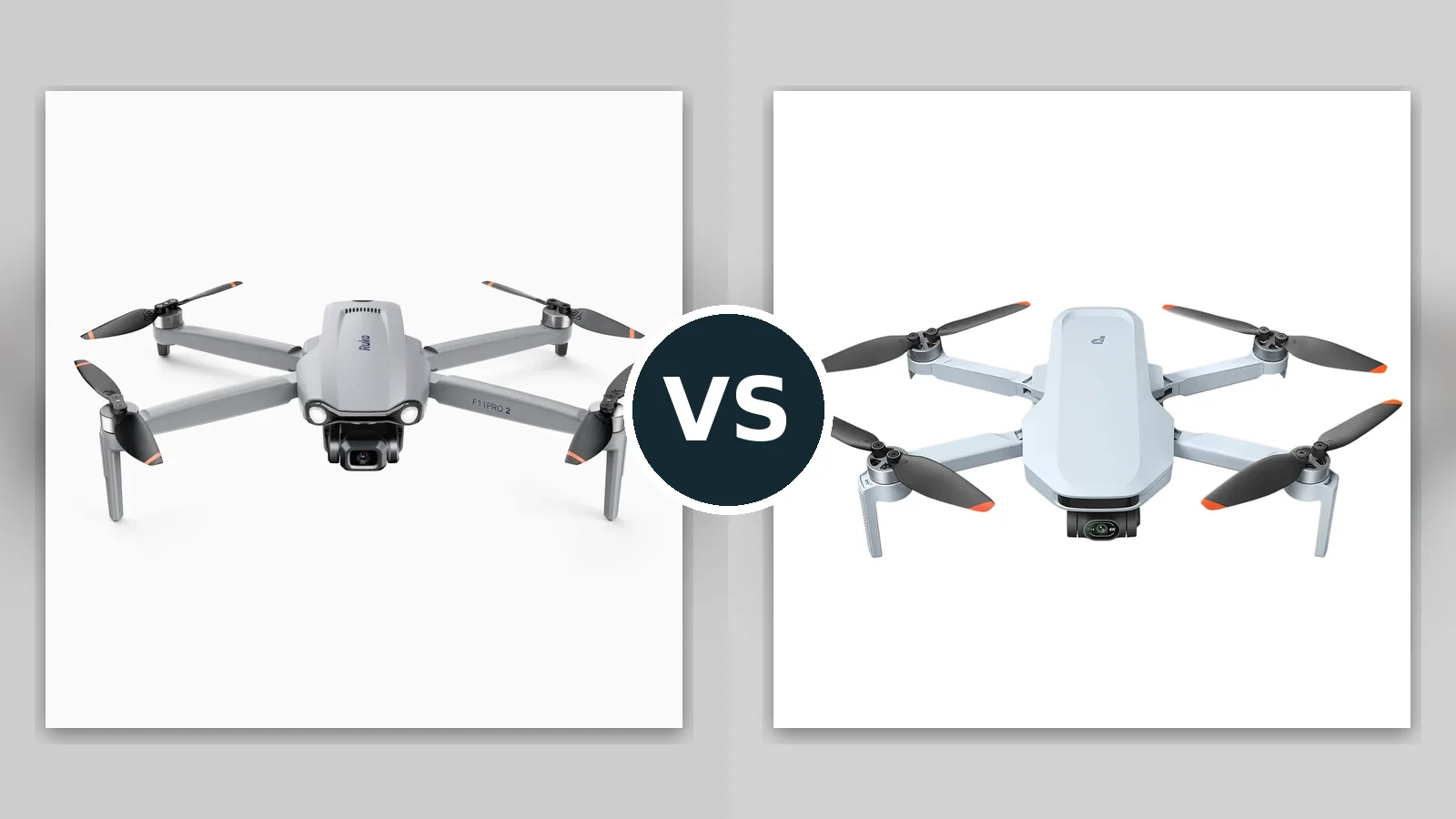
The ruko f11 pro 2 vs potensic atom 2 comparison is the budget shelf’s most honest argument, because these are the two drones that buyers land on after deciding DJI’s prices are not for them. The Ruko F11 Pro 2 (sold as the F11PRO 2) is the value bruiser: a 357 gram GPS drone with a Sony sensor, a true 3-axis brushless gimbal, 4K video, 35-minute batteries usually bundled in pairs for a claimed 70 minutes of total flying, built-in Remote ID, and a feature list that includes Follow Me, waypoint route planning, orbit mode, cruise control and a night mode. The Potensic Atom 2 is the refined minimalist: a folding drone under 249 grams with a 1/2-inch Sony sensor behind an f/1.8 lens, 4K HDR video, AI tracking, a PixSync 4.0 link rated to 10 km, and 32-minute batteries, in a package that skips US registration for recreational pilots. One sells endurance and features per dollar. The other sells lightness, speed and polish. This comparison works through the cameras, the flight experience, the transmission systems and the ownership realities of two non-DJI brands, because at this end of the market the spec sheets promise the most and the details matter the most. By the end you will know which compromises you can live with, which is the only honest way to shop this shelf. One warning before the details: budget drones are where marketing vocabulary stretches furthest, so this article leans on the manufacturers’ own published numbers and names the mechanism behind every feature, because a tracking mode that follows your controller is not the same product as a tracking mode that watches its subject, and a flight-time figure means little until you know how many batteries are in the box.
Affiliate disclosure: As an Amazon Associate I earn from qualifying purchases. This page contains affiliate links. If you buy through them, we may earn a commission.
Atom 2 is the better drone. F11 Pro 2 is the bigger bargain.
Potensic Atom 2 wins on execution: lighter, faster, a far longer link, HDR video, AI tracking and a folding sub-249 gram body that travels anywhere. Ruko F11 Pro 2 wins on the invoice: longer flights per battery, twin-battery kits, built-in Remote ID, and GPS Follow Me and waypoint features at a price the Atom 2 cannot match. Buy the Atom 2 for the flying. Buy the Ruko for the flying time per dollar, with your eyes open about its short transmission range. If your flying field is your own back pasture, the Ruko may be the smartest money in this entire category; if your flying field is wherever the weekend goes, it is the Atom 2 by a clear margin.

Ruko F11 Pro 2
For pilots who want long flights, GPS features and Remote ID built in
The F11 Pro 2 folds to 165 x 90 x 65 mm and opens into a full-size GPS quadcopter with a Sony sensor on a 3-axis brushless gimbal, recording 4K at 30fps to microSD and stills at 5700 x 3200. Its 3200 mAh battery is rated for 35 minutes, and kits commonly include two for up to 70 minutes of total flight. GPS and GLONASS positioning pairs with an optical flow sensor for stable hovers, and the feature set runs deep: Follow Me, Flight Around orbit, waypoint route planning, cruise control, night mode, beginner mode, 5x zoom and vertical shooting, with Remote ID built in.
- 35-minute batteries, typically two in the kit
- 3-axis gimbal and a Sony sensor at a budget price
- Follow Me, waypoints, orbit and cruise control
- Built-in Remote ID for US compliance
Check current availability and bundle options

Potensic Atom 2
For pilots who want DJI-style polish, tracking and range under 249 grams
The Atom 2 folds to roughly 142 x 89 x 58 mm and carries a 1/2-inch Sony CMOS behind a fast f/1.8 lens on a 3-axis gimbal, shooting 4K/30 HDR video and 48MP stills. Its AI Track suite follows subjects in Spotlight, Follow and Parallel modes, with AI Night Shot, QuickShots, Dolly Zoom, panorama and vertical shooting rounding out the camera tricks. PixSync 4.0 carries a 1080p feed up to a rated 10 km, the motors push it to 16 m/s in Sport mode, and each 2330 mAh battery is rated for 32 minutes, with three in Fly More trim.
- 1/2-inch Sony sensor with HDR video and AI tracking
- PixSync 4.0 link rated to 10 km with a 1080p feed
- Under 249 g with a 16 m/s Sport mode
- Vertical shooting, Dolly Zoom and AI Night Shot
Check current availability and bundle options
Endurance per dollar vs polish per gram
Both drones undercut DJI while promising DJI-shaped experiences. The choice is which currency you pay in: the Ruko charges in weight and range, the Atom 2 in sticker price.
Choose Ruko F11 Pro 2 if…
- Your budget is the hardest constraint in the purchase
- You fly your own land, fields or job sites and want long orbits and waypoint routes
- You value two batteries in the box over almost any single feature
- You need built-in Remote ID without buying a separate module
- Your subjects are scenery and property, filmed from a respectful distance
- You are outfitting a farm, ranch or worksite rather than a travel bag
Choose Potensic Atom 2 if…
- You want a drone that travels in a jacket pocket at under 249 g
- You film moving subjects and want real AI tracking
- You fly in varied places and want a long, confident video link
- You shoot vertical video and low-light scenes
- You want the most polished app and flight feel this shelf offers
- You plan to add batteries over time and grow into the kit
F11 Pro 2 vs Atom 2: the budget shelf, line by line
Read the transmission row twice. It is the largest functional gap in the table and the one most likely to shape your first month of ownership. The battery rows run it a close second, because kit configuration decides them more than chemistry does.
| Feature | Ruko F11 Pro 2 | Potensic Atom 2 |
|---|---|---|
| Best suited to | Budget GPS flying, property and land footage, long orbits and planned routes | Travel, tracking and everyday creator flying with minimal weight and fuss |
| Takeoff weight | 357 g including battery | Under 249 g |
| Folded size | 165 x 90 x 65 mm folded; 350 x 385 x 65 mm unfolded | About 142 x 89 x 58 mm folded |
| Sensor and lenses | Sony sensor; 75-degree field of view | 1/2-inch Sony CMOS; f/1.8 lens |
| Video modes | 4K (3840 x 2160) at 30fps recorded to microSD | 4K at 30fps with HDR |
| Photo resolution | 5700 x 3200 stills, JPEG | 48MP stills (marketed as 8K photos), JPEG |
| Stabilization | 3-axis brushless gimbal, camera angle adjustable from -90 to 0 degrees | 3-axis mechanical gimbal |
| Obstacle sensing | None; optical flow and barometer positioning for hover stability | None; downward ToF positioning only |
| Subject tracking | GPS Follow Me (follows the controller), Flight Around orbit, waypoint route planning | AI Track with Spotlight, Follow and Parallel modes, plus QuickShots and Dolly Zoom |
| Rated flight time | 35 minutes per battery; two-battery kits total up to 70 minutes | 32 minutes per battery; up to three batteries in Fly More trim |
| Measured flight time | Not tested by us; manufacturer rating is a lab figure | Not tested by us; expect less in wind or tracking work |
| Max speed | 8 m/s in Sport mode (about 26 ft/s); 6 m/s in stable mode | 16 m/s in Sport mode |
| Video transmission | 5.8 GHz link; maximum range about 10,000 ft (roughly 3 km); live view 1280 x 720 at 25fps | PixSync 4.0, up to 10 km, 1080p live view at 30fps |
| Wind resistance | Level 5 (per Ruko’s official comparison data) | Level 5, up to 10.7 m/s |
| Storage | MicroSD 16 to 128 GB required; no internal storage | None; microSD required |
| Positioning and app | GPS and GLONASS plus optical flow; Ruko Pro app | GPS, GLONASS, Galileo and BeiDou; Potensic Eve app |
| Compliance and extras | Remote ID built in; night mode, beginner mode, cruise control, 5x zoom, vertical shooting | AI Night Shot; vertical shooting; 4x digital zoom; panorama modes |
| Main trade-off | Short transmission range, slow top speed, and a 357 g weight that triggers registration | Costs more, stills are JPEG only, and there is no obstacle sensing at this price either |
Flight times and ranges are manufacturer maximums in ideal conditions. Ruko’s range figure is quoted in feet in its own documentation (10,000 ft, roughly 3 km), well inside the Atom 2’s rated reach.
Five differences that actually decide this one
On feature lists the Ruko keeps pace surprisingly well. The gaps that matter live in transmission, tracking quality, flight feel and the brands behind the boxes.
1. The link: 3 km of leash vs 10 km of confidence
Edge: Atom 2This is the comparison’s headline gap. The Atom 2’s PixSync 4.0 is rated to 10 km with a 1080p live view, which in practice means the feed simply holds together at any distance a pilot should be flying, with the smoothness that makes framing pleasant. The F11 Pro 2’s 5.8 GHz link tops out around 10,000 feet, roughly 3 km, and its live view is 720p at 25fps, which is serviceable for framing and noticeably less crisp for judging focus and detail.
Legal flying is line-of-sight flying, so on paper both ranges suffice. In practice, range headroom is feed reliability: trees, buildings and interference eat signal long before the maximum distance arrives, and the drone with three times the headroom shrugs off obstructions that break the shorter link’s picture. If you fly one open field forever, the Ruko’s leash never chafes. If you fly varied terrain, the Atom 2’s link is the feature you will thank most often.
The feed quality gap rides along with the range gap. Judging exposure, focus and framing on a 720p feed at 25fps is workable but dated, while the Atom 2’s 1080p feed at 30fps feels current. For property flyovers the Ruko’s feed tells you enough. For any shot where you are composing carefully rather than documenting, the Atom 2’s viewfinder is simply the better instrument.
2. Tracking and flight modes: the controller follows vs the camera watches
Edge: Atom 2Both drones advertise follow modes, and the mechanisms are different species. The Atom 2’s AI Track watches the subject with its camera and keeps it framed in Spotlight, Follow or Parallel, the way DJI’s tracking behaves. The Ruko’s Follow Me tracks the GPS position of its controller, which follows you reliably but frames approximately, since the drone knows where your controller is, not what its camera sees.
The Ruko claws ground back on planned flight: genuine waypoint route planning, an orbit mode around a point, and cruise control are working tools for property and land footage, and they are features the Atom 2 matches only partially through its QuickShots and panorama modes. Creators filming themselves moving will feel the Atom’s advantage in every clip. Landowners filming a roofline or a field boundary will feel the Ruko’s, and both feelings are legitimate spec-sheet victories.
Night mode deserves a sentence on the Ruko’s side of the ledger: it is tuned for evening flights around well-lit properties and pairs with the drone’s steady hover to produce usable dusk documentation. The Atom 2’s AI Night Shot is the more sophisticated tool and works on moving everyday subjects, but the Ruko’s presence in this feature category at all shows how seriously it takes the property-owner brief.
3. The camera: HDR and a fast lens vs honest 4K
Edge: Atom 2The Atom 2’s camera is a generation more ambitious: a 1/2-inch Sony sensor behind an f/1.8 lens, 4K video with HDR, an AI Night Shot mode that visibly helps after dark, and 48MP stills for cropping room. On a 3-axis gimbal, its footage has the contrast and evening tolerance that make viewers assume a pricier drone. Its compromises are JPEG-only stills and a digital zoom that should be treated as a framing aid, not a feature.
The Ruko’s camera is honest midrange hardware: a Sony sensor, real 3-axis gimbal stabilization, 4K at 30fps to the card, and 5700 x 3200 stills that print respectably. There is no HDR mode, and the 75-degree lens is narrower than the wide views most drone footage uses, which changes composition habits slightly. In good light the gap between the two cameras is smaller than the price gap; in mixed or low light, the Atom 2 walks away with it.
One practical note for editors: both drones deliver standard, ready-to-share color rather than flat profiles, which suits this audience. The Atom 2’s HDR mode is the exception worth using deliberately on high-contrast days, since it rescues skies that the Ruko would clip. Neither camera pretends to serve colorists, and at these prices that honesty is refreshing.
4. Flight feel and stamina: slow and steady vs quick and light
Edge: Tie, split by tasteThe numbers sketch two personalities. The Ruko: 35-minute batteries, a top speed of 8 m/s in Sport and 6 m/s in stable mode, and a 357 gram airframe that sits in the air with a calm, heavy steadiness its owners describe as confidence. The Atom 2: 32-minute batteries, 16 m/s in Sport, Level 5 wind resistance, and the darting responsiveness of a drone half the Ruko’s weight class ambition.
For camera work, slow is rarely a defect. The Ruko’s pace suits orbits, reveals and inspection passes, and its endurance per battery is the best in this comparison. For everything else, travel, chasing kids and dogs, relocating between compositions, the Atom 2’s speed and lightness keep it feeling modern. Neither drone has obstacle sensing, so both reward pilots who scout their lines first; the Atom 2’s downward ToF and the Ruko’s optical flow both serve hovering, not avoiding.
5. Rules, support and the fine print of budget brands
Edge: SplitRegulation splits the pair neatly. The Atom 2 under 249 g skips US recreational registration. The Ruko at 357 g does not, but it answers with Remote ID built into the airframe, where many heavier budget drones need a bolt-on module; for US pilots it is compliant out of the box, which is a genuine ownership convenience worth money.
Brand depth is the quieter consideration. Potensic’s Atom line is its flagship, with the Eve app receiving the polish that flagship status brings, and the Atom 2 benefits from a large owner community for a non-DJI drone. Ruko’s support and community are respectable and its documentation, including the official comparison data used for this article’s table, is unusually complete for the price class. Neither brand offers DJI’s service network, so on both sides the practical advice is identical: buy from a listing with a real returns window and test everything in the first week.
Spares follow the same pattern. Propellers, batteries and arms for both drones are listed widely at friendly prices, which matters more on this shelf than in the premium class, because budget drones get flown hard by newer pilots. Neither drone should be anyone’s heirloom; both are priced like tools, and both brands stock the consumables like it.
F11 Pro 2 vs Atom 2: what you gain, what you give up
Ruko F11 Pro 2
Reasons to choose it
- 35-minute batteries, usually two in the kit
- 3-axis gimbal and Sony sensor at a fraction of DJI money
- Waypoint planning, orbit mode and cruise control
- Built-in Remote ID for US pilots
- Steady, heavy flight feel for planned camera moves
Reasons to reconsider
- Transmission tops out around 3 km with a 720p feed
- 8 m/s top speed feels slow next to rivals
- 357 g triggers registration requirements
- No HDR, no obstacle sensing, JPEG stills
Potensic Atom 2
Reasons to choose it
- 1/2-inch Sony sensor, f/1.8 lens and HDR video
- AI Track follows subjects with the camera
- 10 km PixSync 4.0 link with a 1080p feed
- Under 249 g, fast, and genuinely pocketable
- Vertical shooting and AI Night Shot
Reasons to reconsider
- Costs meaningfully more than the Ruko
- Stills are JPEG only, with no RAW option
- No obstacle sensing despite the polish
- 32-minute rating is per battery; multi-battery kits cost extra
Batteries, bundles and fine print: check the details
Budget drones are bundle games. The kit contents move the real price more than the drone choice does, so verify these before paying.
- Battery count, Ruko: The F11 Pro 2’s value story is two batteries totaling up to 70 minutes. Confirm the listing actually includes two; single-battery listings erase its main advantage.
- Battery count, Atom 2: Fly More trim carries three batteries and a parallel charging hub. Price the standard kit plus spare batteries before assuming the Ruko wins on cost.
- Storage, both: Neither drone records without a microSD card. The Ruko supports 16 to 128 GB cards; buy a fast, reputable card sized for 4K sessions.
- Registration, Ruko: At 357 g it needs US recreational registration, and its built-in Remote ID covers the broadcast requirement. Budget five minutes, not a module.
- App check, both: Install the Ruko Pro app or the Potensic Eve app before the drone arrives and confirm your phone is supported; both drones are flown through their apps.
- Returns window, both: Budget brands vary in support depth. Buy through a listing with a clear returns policy and test transmission range and gimbal calibration in week one.
The bargain bruiser or the polished mini
Choose the Potensic Atom 2 if you want the best drone in this comparison: it is lighter, faster, sharper, longer-legged and smarter about following subjects, and it asks for no registration. It is the budget drone that feels least like a compromise. Choose the Ruko F11 Pro 2 if the budget is genuinely tight and your flying is planned, local and patient: its twin-battery endurance, waypoint toolkit, 3-axis gimbal and built-in Remote ID deliver an honest working drone for remarkably little money, as long as its 3 km leash matches your landscape. The mistake to avoid is buying the Ruko for adventures its link cannot reach, or stretching for the Atom 2 when the Ruko’s kit already covers your actual flights twice over. Budget drones punish vague buying more than premium ones do, because their compromises are real; matched carefully to your flying, though, both of these deliver far more drone than their prices suggest.
Still deciding?
Is the Ruko F11 Pro 2 a real product, and how is it different from the F11 Pro?
Yes. The F11 Pro 2 (styled F11PRO 2) is Ruko’s updated model with its own manual and official specification listing: a 357 g airframe, 3200 mAh batteries rated at 35 minutes, 4K video at 5700 x 3200 stills capability, and built-in Remote ID. It is a distinct, newer product rather than a relabel of the earlier F11 line.
Which drone has better range, the F11 Pro 2 or the Atom 2?
The Atom 2, decisively. Its PixSync 4.0 link is rated to 10 km with a 1080p live view. The F11 Pro 2’s link is rated around 10,000 ft (roughly 3 km) with a 720p live view at 25fps. Both exceed legal line-of-sight flying, but the Atom 2’s headroom means a cleaner feed around trees and buildings.
Do either of these drones avoid obstacles?
No. Neither the F11 Pro 2 nor the Atom 2 has obstacle avoidance. The Ruko uses optical flow and GPS for stable hovering; the Atom 2 uses downward ToF for positioning. Both rely on the pilot for awareness, so scout flight paths and keep altitude discipline.
Which drone flies longer?
Per battery it is close: 35 rated minutes for the Ruko against 32 for the Atom 2. In kit form the Ruko usually wins the day, since two-battery bundles are its standard offer, while the Atom 2 needs its Fly More kit to reach three batteries. Real-world figures land below both ratings in wind, and both drones are best planned around landing with a reserve rather than chasing the brochure number.
Do I need to register these drones in the US?
The Atom 2, under 249 g, is exempt from recreational registration. The F11 Pro 2 at 357 g must be registered for recreational flight, and it broadcasts Remote ID from the factory, so no separate module is needed. Commercial use changes the rules for both; check the FAA’s current guidance.
How were these drones compared?
This is a research-based comparison built from Ruko’s and Potensic’s published specifications, manuals and official comparison data, cross-checked between sources. Flight times and ranges are the manufacturers’ rated figures in ideal conditions, and measured flight time is listed as not tested. The methodology section below lists the sources used.
How this comparison was prepared
This comparison is research-based. We did not fly either drone for this article, and nothing here should be read as hands-on testing. Every specification in the table was taken from the manufacturers’ published documentation for the Ruko F11 Pro 2 and the Potensic Atom 2, including Ruko’s official camera-drone comparison data and user manual and Potensic’s official product specifications, and each figure was checked against the matching figure for the other drone so rated values are compared like for like. Where secondary sources disagreed with a manufacturer’s own figures, for example on the F11 Pro 2’s wind rating, the manufacturer’s published value was used. Where a capability did not appear in the verified specification set, the table says so rather than filling the gap with an estimate. Flight times and transmission ranges quoted are manufacturer rated maximums under ideal conditions; real-world results are lower. Sources are listed by name only below, in line with our editorial policy.
Sources
- Ruko F11 Pro 2 official specifications and camera drone comparison data (rukotoy.com)
- Ruko F11PRO 2 user manual (Ruko)
- Potensic Atom 2 official specifications (potensic.com)
- Potensic Atom 2 user manual (Potensic)
- Potensic Eve app documentation (Potensic)
- Ruko Pro app documentation (Ruko)
Last verified: October 20, 2026. Specifications and bundle contents may change; check the listing carefully before you buy.


